Building a Diet AI Assistance App having Converstational feature build using Amazon Bedrock, RAG Knowledge Bases, Cognito, API Gateway, Lambda, DynamoDB
Learn how to design a secure, serverless, multi-user AI Diet Assistant using Amazon Bedrock, RAG, Knowledge Bases, Amazon Cognito, API Gateway, Lambda, DynamoDB
By Suresh Madhra · Community contribution
Generative AI applications become much more useful when they combine a large language model with enterprise or domain-specific knowledge. A common issue when moving GenAI prototypes into production is transitioning from a single-user local script to a secure, multi-tenant backend that isolates user histories and handles authentication properly.
I put together a comprehensive technical walkthrough for a serverless RAG application (a Multi-User Diet Assistant) using AWS services.
The architecture handles:
Authentication & Authorization: Amazon Cognito + API Gateway JWT authorizer to prevent unauthenticated access.
Context vs. History: Isolating user conversation sessions in DynamoDB while sourcing domain reference documents from Amazon S3 via Bedrock Knowledge Bases.
Backend Security: Deriving authenticated user context directly from JWT headers rather than payload trust.In this project, we build the architecture for a secure, multi-user Diet Assistant that uses Retrieval-Augmented Generation (RAG), user authentication, conversation management, and serverless AWS services.
The application allows multiple users to sign in securely, ask diet-related questions, retrieve relevant information from a knowledge base, generate AI-powered responses, and maintain separate conversation histories.
The complete solution combines:
- Amazon Cognito for authentication
- Amazon API Gateway for secure API access
- AWS Lambda for application orchestration
- Amazon Bedrock Knowledge Bases for RAG
- Amazon S3 as the knowledge base document source
- Amazon Bedrock foundation models for AI response generation
- Amazon DynamoDB for user conversations and chat history
The Problem We Are Solving
A simple chatbot can send a question directly to a large language model:
User → Application → LLM → ResponseHowever, a production-ready application requires more capabilities:
- Multiple users must be authenticated securely.
- Each user should have isolated conversations.
- A conversation must maintain its own context and history.
- The AI should answer using trusted domain knowledge.
- The solution should scale without managing servers.
- The backend must not trust user identity supplied only by the browser.
This leads us to a secure multi-user RAG architecture.
High-Level Architecture
The complete request flow is:
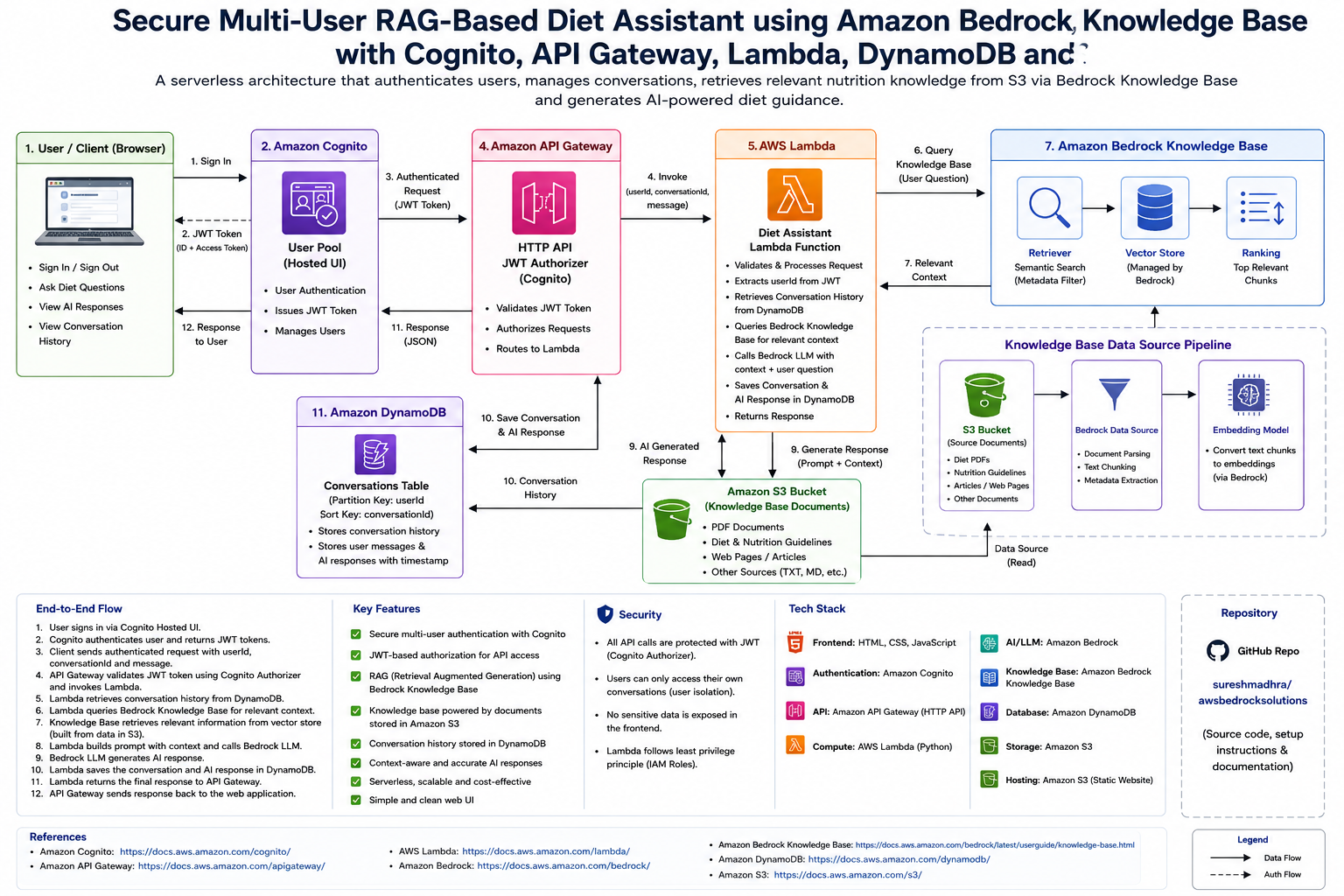
The architecture separates authentication, conversation storage, knowledge retrieval, and AI generation.
Architecture Components
1. Web Application
The web application is the entry point for the user.
Its responsibilities include:
- Redirecting users to the Cognito Hosted UI for login
- Receiving OAuth authorization responses
- Managing the authenticated session
- Sending user messages to the backend
- Passing the JWT token in the Authorization header
- Displaying the AI response
A typical API request contains:
{
  "userId": "cognito-user-sub-id",
  "conversationId": "unique-conversation-id",
  "message": "What should I eat for a healthy breakfast?"
}
The request is also protected with:
Authorization: Bearer <JWT_ACCESS_TOKEN>2. Amazon Cognito: Secure User Authentication
Amazon Cognito manages user authentication.
The user signs in through the Cognito Hosted UI. After successful authentication, Cognito issues tokens such as:
- ID Token
- Access Token
- Refresh Token
The most important user identifier is the sub claim.
Example:
{
  "sub": "12345678-abcd-1234-abcd-123456789012",
  "email": "user@example.com",
  "cognito:username": "user"
}
The sub value uniquely identifies the user.
Why Use Cognito?
Using Cognito provides:
- Secure authentication
- Centralized user management
- JWT-based authorization
- Multi-user support
- Integration with API Gateway
3. Amazon API Gateway: Secure API Entry Point
Amazon API Gateway exposes the backend API to the web application.
A typical route can be configured as:
POST /The route integrates with AWS Lambda.
The route is protected using a JWT authorizer configured with Cognito.
Conceptually:
Route: POST /
Authorization: JWT Authorizer
Identity Source: $request.header.Authorization
Integration: AWS Lambda
When the browser sends:
Authorization: Bearer <JWT_TOKEN>API Gateway validates the token before invoking Lambda.
Request
   ↓
API Gateway JWT Authorizer
   ↓
Token Valid?
   ├── No  → Unauthorized
   └── Yes → Invoke Lambda
This prevents unauthenticated users from accessing the backend.
4. AWS Lambda: The Application Orchestrator
AWS Lambda contains the core application logic.
The Lambda function can perform the following steps:
- Parse the incoming request.
- Identify the authenticated user.
- Validate the conversation ID and message.
- Retrieve relevant conversation history from DynamoDB.
- Query the Amazon Bedrock Knowledge Base.
- Receive relevant context from the knowledge base.
- Build a prompt using conversation history, retrieved context, and the current user message.
- Invoke the Amazon Bedrock model.
- Store the user message and AI response.
- Return the response to the web application.
Lambda acts as the orchestration layer between the API, database, knowledge base, and LLM.
5. User ID, Conversation ID and Message
A multi-user chat application should clearly distinguish between user identity and conversation identity.
User ID
The user ID identifies the authenticated person.
Recommended source:
Cognito JWT → sub claimExample:
userId = 12345678-abcd-1234-abcd-123456789012Conversation ID
A single user can have multiple conversations.
For example:
User A
├── Conversation 1: Healthy Breakfast
├── Conversation 2: Weight Management
└── Conversation 3: Nutrition Questions
A UUID can be generated when a new conversation starts.
Message
The message is the current question submitted by the user.
Example:
What are some healthy breakfast options?The API request model becomes:
{
  "userId": "cognito-user-sub-id",
  "conversationId": "conversation-uuid",
  "message": "What are some healthy breakfast options?"
}
6. Amazon DynamoDB: Conversation History
DynamoDB stores the application conversation data.
A conversation record can contain:
| Field | Purpose | |---|---| | userId | Identifies the user | | conversationId | Identifies the chat conversation | | timestamp | Maintains message ordering | | role | User or assistant | | message | Message content |
Example logical records:
| userId | conversationId | role | message | |---|---|---|---| | user-001 | conv-001 | user | What is a healthy breakfast? | | user-001 | conv-001 | assistant | A healthy breakfast can include... | | user-001 | conv-002 | user | How can I improve my diet? |
Why DynamoDB?
DynamoDB provides:
- Serverless scaling
- Low operational overhead
- Fast access to conversation history
- Easy integration with Lambda
Important Distinction
DynamoDB and the Bedrock Knowledge Base serve different purposes.
DynamoDB answers:
What did this user say previously?Knowledge Base answers:
What trusted domain information is relevant to this question?Both are important in a RAG-based conversational application.
7. Amazon S3: Knowledge Base Document Storage
Amazon S3 is the source location for the documents used by the Knowledge Base.
For a Diet Assistant, the S3 bucket can contain:
- Nutrition guidelines
- Diet plans
- Food recommendations
- Medical or wellness reference documents
- Research articles
- PDF documents
- TXT or other supported content
Example:
S3 Bucket
│
├── nutrition-guidelines.pdf
├── healthy-breakfast.pdf
├── food-recommendations.pdf
└── diet-reference-documents/
The S3 bucket is connected to the Amazon Bedrock Knowledge Base as a data source.
This is an important part of the architecture because the knowledge base needs documents from which relevant information can be retrieved.
8. Amazon Bedrock Knowledge Base: Retrieval-Augmented Generation
The Amazon Bedrock Knowledge Base provides the retrieval layer of the application.
The process is:
Documents in Amazon S3
        ↓
Knowledge Base Data Source
        ↓
Document Parsing and Chunking
        ↓
Embedding Generation
        ↓
Vector Storage
        ↓
Semantic Search
        ↓
Relevant Context
When the user asks a question, Lambda queries the Knowledge Base.
For example:
User Question:
"What foods are recommended for a healthy breakfast?"
The Knowledge Base retrieves semantically relevant chunks from the indexed documents.
The retrieved context is then used together with the user's message.
This pattern is called Retrieval-Augmented Generation (RAG).
9. Why RAG Is Important
Without RAG:
User Question
      ↓
LLM
      ↓
General Response
With RAG:
User Question
      ↓
Knowledge Base Retrieval
      ↓
Relevant Domain Context
      ↓
LLM
      ↓
Grounded Response
The Knowledge Base helps the application provide responses based on the documents supplied to the system.
10. Amazon Bedrock LLM: AI Response Generation
After relevant context is retrieved, Lambda invokes an Amazon Bedrock foundation model.
The model receives:
- Current user message
- Relevant conversation history
- Relevant context retrieved from the Knowledge Base
- Application instructions
Conceptually:
Prompt =
System Instructions
+
Conversation History
+
Knowledge Base Context
+
Current User Message
The model then generates the final AI response.
Supported model choices may include models available through Amazon Bedrock, depending on the AWS account and region configuration.
End-to-End Request Flow
The complete workflow is as follows.
Step 1: User Signs In
The user opens the application and selects Login.
Web Application → Amazon CognitoStep 2: Cognito Authenticates the User
Cognito validates the user's credentials and returns JWT tokens.
Cognito → ID Token + Access TokenStep 3: User Sends a Message
The application sends:
{
  "userId": "user-id",
  "conversationId": "conversation-id",
  "message": "user question"
}
The JWT access token is included in the Authorization header.
Step 4: API Gateway Validates JWT
The JWT authorizer validates the Cognito token.
Only valid requests are allowed to continue.
Step 5: Lambda Processes the Request
Lambda validates and processes the message.
Step 6: Retrieve Conversation History
Lambda retrieves relevant previous messages from DynamoDB.
Step 7: Query the Bedrock Knowledge Base
Lambda sends the user question to the Knowledge Base.
Step 8: Knowledge Base Retrieves Relevant Context
The Knowledge Base searches indexed content originating from documents stored in Amazon S3.
Step 9: Lambda Invokes the Bedrock Model
Lambda combines:
Conversation History
+
Knowledge Base Context
+
Current Message
and sends the prompt to the LLM.
Step 10: AI Generates a Response
Amazon Bedrock returns the generated response.
Step 11: Store the Conversation
Lambda stores the user message and AI response in DynamoDB.
Step 12: Return Response to User
The response flows back through API Gateway to the web application.
Security Architecture
Security is an essential part of this design.
Cognito Authentication
Only authenticated users can access the application backend.
JWT Authorization
API Gateway validates the JWT token before Lambda execution.
User Isolation
Conversation records should be associated with the authenticated user.
A user should not be able to access another user's conversations.
Avoid Trusting Client-Supplied Identity Alone
Although the frontend can send a userId, the backend should ideally derive the trusted user identity from validated JWT claims.
For an HTTP API JWT authorizer, the Lambda function can access claims through the API Gateway request context.
Conceptually:
This is more secure than relying exclusively on a user ID supplied in the request body.
IAM Least Privilege
Lambda should receive only the permissions required for:
- DynamoDB access
- Bedrock model invocation
- Knowledge Base retrieval
- Logging
Recommended Project Structure
The repository can focus on backend infrastructure and documentation.
As requested, the frontend HTML file is not included in the recommended repository structure below.
awsbedrocksolutions/
│
├── backend/
│   ├── lambda_function.py
│   └── requirements.txt
│
├── architecture/
│   └── architecture-diagram.png
│
├── README.md
└── .gitignore
The architecture image can also be referenced in the README.
Key Benefits of This Architecture
Multi-User Support
Amazon Cognito provides secure user authentication.
Conversation Management
DynamoDB separates conversations using user ID and conversation ID.
Domain-Specific Knowledge
Amazon S3 stores documents that feed the Bedrock Knowledge Base.
RAG-Based Responses
The Knowledge Base retrieves relevant information before AI generation.
Serverless Scalability
API Gateway, Lambda, DynamoDB, S3, Cognito, and Bedrock reduce infrastructure management.
Secure API Access
JWT authorization protects the backend.
Example Request and Response
Request
{
  "userId": "12345678-abcd-1234-abcd-123456789012",
  "conversationId": "6495ead7-004d-4175-9d7a-2175276c0b47",
  "message": "Suggest a healthy breakfast."
}
Response
{
  "response": "A healthy breakfast can include a balanced combination of whole grains, protein, fruits, and vegetables.",
  "conversationId": "6495ead7-004d-4175-9d7a-2175276c0b47"
}
The exact response format can be adjusted to match the Lambda API contract.
Technology Stack
| Layer | AWS Service / Technology | |---|---| | Frontend | HTML, CSS, JavaScript | | Authentication | Amazon Cognito | | API | Amazon API Gateway HTTP API | | Authorization | JWT Authorizer | | Compute | AWS Lambda | | AI / LLM | Amazon Bedrock | | RAG | Amazon Bedrock Knowledge Bases | | Document Storage | Amazon S3 | | Conversation Storage | Amazon DynamoDB |
Future Enhancements
This architecture can be extended with:
- Conversation list and chat history UI
- Multiple conversations per user
- New conversation button
- Conversation titles
- User feedback and ratings
- Streaming model responses
- Guardrails for Amazon Bedrock
- Monitoring with Amazon CloudWatch
- AWS X-Ray tracing
- Infrastructure as Code using AWS CDK or Terraform
- CI/CD deployment pipeline
- Document ingestion automation
- Personalized nutrition profiles
Conclusion
Building a Generative AI application requires more than connecting a web page directly to a language model.
A production-oriented solution should address authentication, authorization, conversation isolation, persistent history, domain knowledge, and scalable backend processing.
This project demonstrates a complete serverless architecture using:
Amazon Cognito
        +
Amazon API Gateway
        +
AWS Lambda
        +
Amazon DynamoDB
        +
Amazon S3
        +
Amazon Bedrock Knowledge Base
        +
Amazon Bedrock LLM
The result is a secure multi-user RAG-based Diet Assistant capable of retrieving relevant knowledge, maintaining user conversations, and generating AI-powered responses.
Source Code
The project source code and related implementation can be found in the GitHub repository:
https://github.com/sureshmadhra/awsbedrocksolutions