Build an Enterprise LLM Assistant with AWS Lambda, API Gateway and Amazon Bedrock
Build a production-ready foundation for context-aware GenAI applications using Amazon Bedrock, AWS Lambda and API Gateway—supporting prompts, email/text context, and PDF-based interactions through a single lightweight interface.
By Suresh Madhra · Community contribution
Generative AI applications are often introduced with a simple example: send a prompt to an LLM and display the response. A real application usually needs more. A user may ask a question without context, paste an email and summarize it, provide text and ask the model to draft a response, or upload a PDF and ask questions about it.
This article builds a simple Enterprise LLM Assistant using HTML/JavaScript, Amazon API Gateway, AWS Lambda, Amazon Bedrock, Amazon Nova Micro, and pypdf.
1. What Are We Building?
+------------------------------------------------+
|              Enterprise LLM Assistant          |
+------------------------------------------------+
| Prompt / Question                              |
| +--------------------------------------------+ |
| | Ask anything...                            | |
| +--------------------------------------------+ |
|                                                |
| Context (Optional)                             |
| +--------------------------------------------+ |
| | Paste email or other context here...       | |
| +--------------------------------------------+ |
|                                                |
| PDF Context (Optional)                         |
| [ Choose PDF ]                                 |
|                                                |
|              [ Send to LLM ]                   |
+------------------------------------------------+
| LLM Response                                   |
+------------------------------------------------+
The user does not need to select a mode. The application determines what to send based on the information provided.
2. Three Supported Scenarios
Prompt only
Prompt → API Gateway → Lambda → Amazon Nova Micro → ResponsePrompt + text context
Lambda receives the context and prompt, combines them into an instruction, and sends the request to Nova Micro.
Prompt + PDF
Browser
   |
   | PDF + Prompt
   v
API Gateway
   |
   v
Lambda
   |
   | Extract PDF text
   v
pypdf
   |
   v
Build LLM prompt
   |
   v
Amazon Nova Micro
   |
   v
Answer
In this initial implementation, the PDF is converted to text and included directly in the prompt. We are not using a vector database or RAG yet.
3. High-Level Architecture
The solution uses a lightweight serverless architecture to connect the web client with Amazon Bedrock while supporting optional text and PDF context.
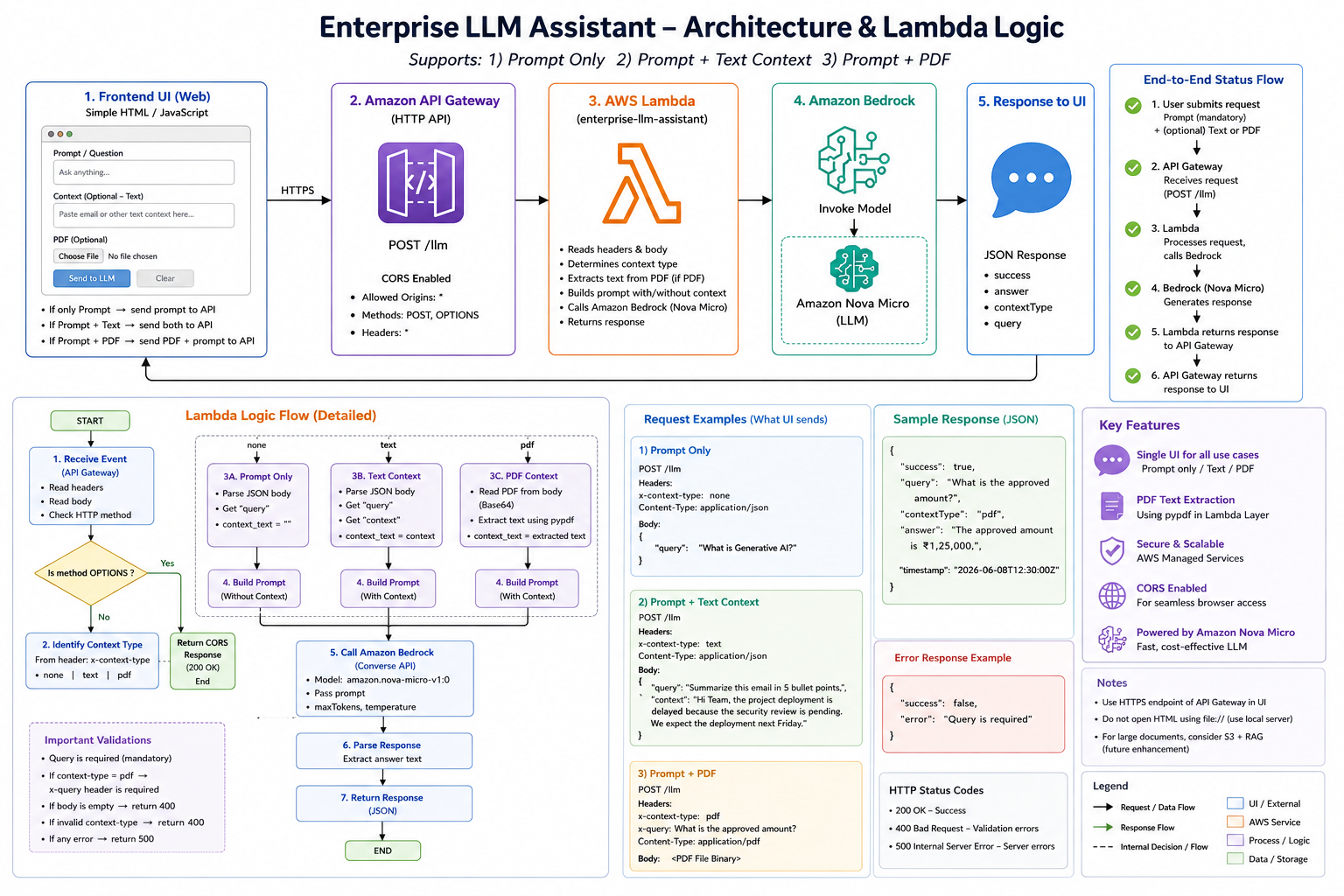
Figure 1: End-to-end architecture of the Enterprise LLM Assistant.
4. Lambda Logic
The Lambda function acts as the orchestration layer and determines how the request should be processed based on the context supplied by the user.
The Lambda performs these steps:
Receive Event
      |
      v
Validate Request
      |
      v
Identify Context Type
      |
      +-------------+-------------+
      |             |             |
     none          text          pdf
      |             |             |
      |             |        Extract PDF text
      |             |             |
      +-------------+-------------+
                    |
                    v
              Build Prompt
                    |
                    v
             Bedrock Converse
                    |
                    v
             Nova Micro
                    |
                    v
             JSON Response
5. Lambda Function
The Lambda receives the API Gateway request, determines the context type, optionally extracts PDF text, builds the prompt, calls Bedrock Converse, and returns JSON.
6. How the Lambda Decision Works
For no context:
Only the user prompt is sent.
For text:
Lambda combines:
context + queryFor PDF:
The flow is:
PDF
 ↓
Binary/Base64 payload
 ↓
pypdf
 ↓
Extracted text
 ↓
Prompt
 ↓
Amazon Nova Micro
7. Calling Amazon Nova Micro
The Lambda uses the AWS SDK for Python:
The Bedrock Runtime client is created with:
The model ID is:
The request is sent through:
The Converse API provides a consistent message-based interface for supported Bedrock models.
8. HTML Request Patterns
Prompt only
fetch(API_URL, {
    method: "POST",
    headers: {
        "Content-Type": "application/json",
        "x-context-type": "none"
    },
    body: JSON.stringify({
        query: prompt
    })
});
Prompt + text
fetch(API_URL, {
    method: "POST",
    headers: {
        "Content-Type": "application/json",
        "x-context-type": "text"
    },
    body: JSON.stringify({
        query: prompt,
        context: context
    })
});
Prompt + PDF
fetch(API_URL, {
    method: "POST",
    headers: {
        "Content-Type": "application/pdf",
        "x-context-type": "pdf",
        "x-query": prompt
    },
    body: pdfBytes
});
9. Example: Email Summarization
Context:
Hi John,

The project deployment has been delayed because
the security review is still pending.

We expect the deployment to happen next Friday.

Regards,
David
Prompt:
Summarize this email in three bullet points.Possible response:
• Project deployment has been delayed.
• Security review is still pending.
• Deployment is expected next Friday.
10. Example: PDF Question Answering
Suppose the user uploads an insurance claim PDF.
Prompt:
What is the claim number and approved amount?Example response:
The claim number is CLM-2026-004817,
and the approved amount is ₹72,500.
11. API Response
{
  "success": true,
  "query": "What is the approved amount?",
  "contextType": "pdf",
  "answer": "The approved amount is ₹72,500."
}
The frontend reads data.answer and displays the response.
12. CORS
During development, the Lambda response includes:
Access-Control-Allow-Origin: *
Access-Control-Allow-Headers: *
Access-Control-Allow-Methods: POST, OPTIONS
For production, replace * with the specific application origin.
13. Lambda Layer for PDF Processing
The Lambda uses:
The pypdf package can be provided through a Lambda Layer:
pypdf-layer.zip

└── python/
    ├── pypdf/
    └── pypdf-*.dist-info/
14. Testing the API Before the UI
Prompt only
curl -X POST \
"https://YOUR_API_ID.execute-api.us-east-1.amazonaws.com/llm" \
-H "Content-Type: application/json" \
-H "x-context-type: none" \
-d '{"query":"What is Amazon Bedrock?"}'
Text context
curl -X POST \
"https://YOUR_API_ID.execute-api.us-east-1.amazonaws.com/llm" \
-H "Content-Type: application/json" \
-H "x-context-type: text" \
-d '{
  "context":"The project deployment is scheduled for next Friday.",
  "query":"When is the project deployment scheduled?"
}'curl -X POST \
"https://YOUR_API_ID.execute-api.us-east-1.amazonaws.com/llm" \
-H "Content-Type: application/pdf" \
-H "x-context-type: pdf" \
-H "x-query: What is the claim number and approved amount?" \
--data-binary "@sample_claim.pdf"15. End-to-End Request Flow
User enters prompt + uploads PDF
              |
              v
          HTML / JS
              |
              v
       API Gateway POST /llm
              |
              v
            Lambda
              |
              v
       Identify PDF context
              |
              v
        Extract PDF text
              |
              v
          Build prompt
              |
              v
      Bedrock Converse API
              |
              v
        Amazon Nova Micro
              |
              v
       Extract model answer
              |
              v
         JSON response
              |
              v
          HTML displays
16. Current Architecture vs Future Architecture
Current architecture:
HTML
 |
API Gateway
 |
Lambda
 |
PDF text extraction
 |
Nova Micro
This is suitable for small PDFs, emails, short documents, document Q&A, summarization, rewriting, classification and information extraction.
17. Future S3 + RAG Architecture
                  +----------------+
                  |   Web UI       |
                  +-------+--------+
                          |
                          v
                  +----------------+
                  | API Gateway    |
                  +-------+--------+
                          |
                          v
                  +----------------+
                  | Lambda         |
                  +-------+--------+
                          |
             +------------+-------------+
             |                          |
             v                          v
       +-----------+             +-------------+
       | Amazon S3 |             | User Query  |
       | Documents |             +------+------+
       +-----+-----+                    |
             |                          |
             v                          v
       +----------------+       +----------------+
       | Knowledge Base |<------| Semantic Search|
       | / RAG          |       +----------------+
       +-------+--------+
               |
               v
       Relevant document chunks
               |
               v
       +----------------+
       | Amazon Nova    |
       | Micro          |
       +-------+--------+
               |
               v
            Response
Instead of sending an entire document to the model, the application retrieves only the relevant pieces.
18. Security Considerations
The proof of concept uses:
Access-Control-Allow-Origin: *For production, consider:
- Authentication
- Authorization
- Restricted CORS origins
- API throttling
- Input validation
- File size limits
- File type validation
- CloudWatch monitoring
- IAM least-privilege policies
- Encryption
- Audit logging
- Prompt-injection protection
- Sensitive-data handling policies
19. Key Learning
An LLM application is not simply:
Prompt → LLMA production-oriented application looks more like:
User
 |
 v
Frontend
 |
 v
API
 |
 v
Application Logic
 |
 +---- Context processing
 +---- Validation
 +---- Prompt construction
 +---- Model orchestration
 |
 v
LLM
 |
 v
Response processing
 |
 v
User
The LLM is one component of the application. The surrounding architecture turns the model into a usable product.
20. Conclusion
We built an enterprise-style LLM assistant using AWS managed services.
The application supports:
- Direct LLM questions
- Text and email context
- PDF-based question answering
- A simple browser interface
- API-based integration
- Serverless backend processing
- Amazon Bedrock
- Amazon Nova Micro
The next step is to evolve the application into a more enterprise-ready GenAI platform using S3, RAG, vector search, conversation history, authentication, guardrails, observability, streaming responses, multi-model support and agentic workflows.
This provides a path from a simple LLM proof of concept to a production-grade enterprise GenAI application.
References
- Amazon Bedrock Converse API
- Boto3 Bedrock Runtime
converseAPI - Amazon Nova documentation
- AWS Lambda documentation
- Amazon API Gateway documentation